Debt by customer
Review open documents, transactions and the customer account balance.

Collect customer payments
See what each customer owes and review how their balance will change before recording a payment.
In everyday use
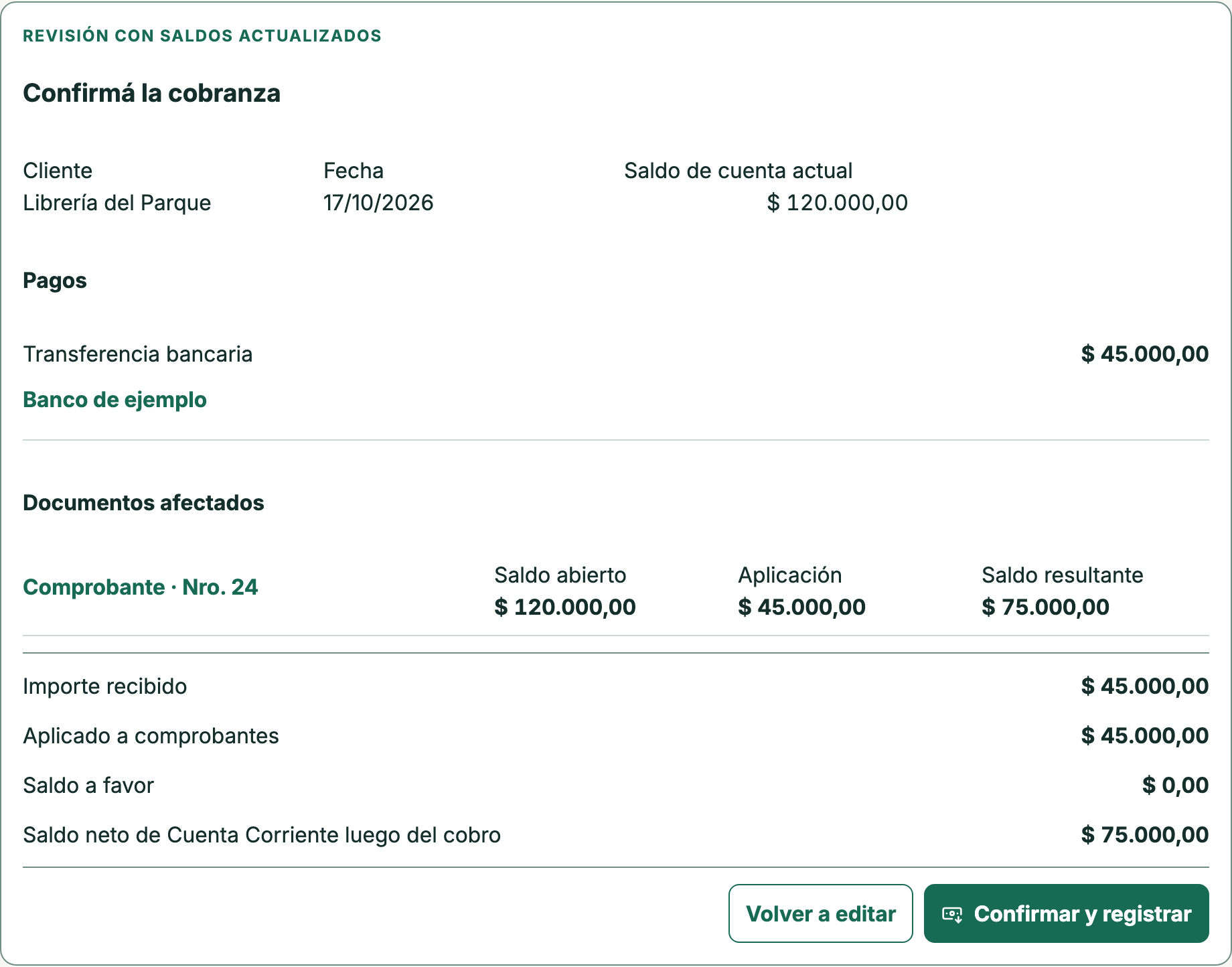
Against ARS 120,000 owed, the review applies ARS 45,000 and projects ARS 75,000 remaining. This Spanish product screen uses sample data and has not confirmed the payment yet.
Choose the customer and documents being paid.
Enter the amount received and review its application.
Check the projected balance before confirming the record.
Choose the invoice to apply the amount received to and check the projected balance. This review has not recorded the payment yet.
Review open documents, transactions and the customer account balance.
Apply the amount received to the invoices being paid, even when it does not settle the whole debt.
After confirmation, review the payment and its receipt. Reversals keep their reason in the history.
Review open documents and the balance in the customer account. To record a partial payment, first check the amount applied and the projected outstanding balance in the payment review.
See how to record a partial payment →No. It shows the application and projected balance before confirmation. Recording the payment is a later step.
You can record payment methods and withholdings, then review how they apply to customer documents.
14-calendar-day trial on paid plans, starting when you create your company. No card or automatic charges.